1 Button Deploy
From zero to a fully operational client environment in a single click. Every client gets a completely separate environment — their own database, their own Workers, their own DNS — not a shared tenancy with feature flags.
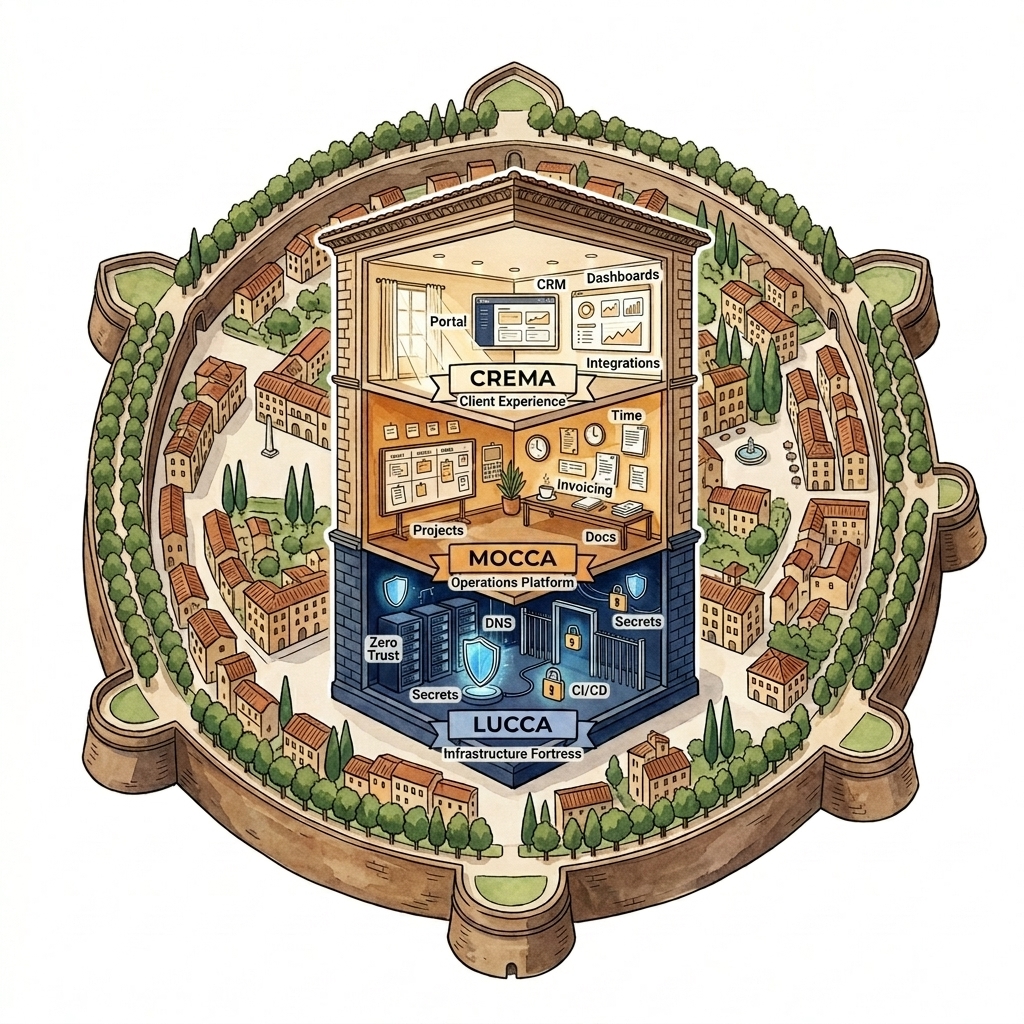
The Three Layers
Mio's deployment architecture is built on three distinct layers, each with a clear responsibility, keeping infrastructure, platform code, and client environments strictly separated.
- Compute — Cloudflare Workers (API) + Pages (Dashboard) — or Vercel for Next.js depending on requirements.
- Database — Neon Serverless PostgreSQL. Dedicated project and credentials per client.
- Auth & Access — Microsoft Entra ID SSO paired with Cloudflare Zero Trust access policies.
- DNS & Routing — Automated zone configuration and secure SSL subdomain routing.
- Storage & Secrets — Dedicated Cloudflare R2 bucket and auto-injected encrypted environment secrets.
- Mocca_Client — The white-label core dashboard shell, including sidebar navigation, authentication context, and core user systems.
- BoardRM — Board portal module including meetings, agendas, resolutions, document storage, and signature routing.
- CRM_Base — Sales pipeline, client lifecycle management, and core contact tracking.
- Mocca_Workflow — Unified approvals engine, automated task assignment, and trigger systems.
- Integrations — Pluggable connectors for third-party systems like Xero, SAP, NetSuite, and HubSpot.
- Tailored Assembly — A client-specific build combining the Mocca_Client shell, chosen operational modules, and required integration connectors.
- Absolute Isolation — Zero shared resources. A client instance owns its data, codebase, infrastructure parameters, and lifecycle.
The Module Catalogue
Every feature inside Mio's system is treated as a pluggable, isolated module. This guarantees that code is clean, self-contained, and easily composed.
Mocca_Client
✅ BUILT & COREThe dashboard shell, navigation menu, notification bell, command palette, and base configurations.
BoardRM
✅ BUILTGovernance module. Includes meetings organizer, document vault, RSVP responder, and resolution sign-off.
CRM_Base
🔜 PLANNEDClient onboarding, lead tracking, engagement timelines, and team assignment boards.
Mocca_Workflow
🔜 PLANNEDCustom step automation, approval routing, task queues, and automated alerting systems.
Pluggable Integrations
Xero Integration
✅ ACTIVEBi-directional sync of contacts, invoices, quotes, and payment records.
ERP Integrations
🔜 PLANNEDAdapters for enterprise planning systems: SAP, NetSuite, and Microsoft Dynamics 365 Business Central.
HubSpot & CRM Sync
🔜 PLANNEDConnectors to synchronize pipelines, active contacts, and status updates.
Local Accounts & E-Commerce
🔜 PLANNEDIntegrations built for Accredo ERP and Shopify e-commerce engines.
Git Repository Structure
Git serves as the single source of truth. Each module lives in its own repository, enabling independent versioning, isolated CI/CD testing, and custom composition per client.
Module Repositories (Independent)
Each module is hosted in its own repository, declaring its specific database schemas, API endpoints, dashboard viewpages, and migrations.
- 📁 mioltd/mocca-client
- 📁 mioltd/board-rm
- 📁 mioltd/crm-base
- 📁 mioltd/integration-xero
Client Repository (Composed)
A client environment repository pulls in designated module packages via npm or git submodules, governed by their module manifest.
- 📁 mioltd/panna
- ├── 📄 manifest.json (Module Registry)
- ├── 📁 apps/api/ (composes active API routes)
- ├── 📁 apps/dashboard/ (composes active UI pages)
- └── 📁 migrations/ (composed DB schema)
The Module Registry (manifest.json)
The manifest.json is the declaration of a client's environment. It dictates what gets built, what routes get exposed, what schemas are configured, and what infrastructure gets provisioned.
{
  "client": {
    "name": "Panna",
    "slug": "panna",
    "domain": "panna.mocca.nz"
  },
  "infrastructure": {
    "provider": "cloudflare",
    "database": "neon",
    "auth": "microsoft-sso"
  },
  "modules": {
    "mocca_client": { "enabled": true, "version": "latest" },
    "crm_base": { "enabled": true, "version": "1.2.0" },
    "board_rm": { "enabled": false },
    "integrations": {
      "xero": { "enabled": true }
    }
  }
}The Deployment Cascade
By reading the manifest.json, the deployment flow programmatically builds out the client instance.
| Deployment Task | Manual Provisioning | Lucca Automated Provisioning |
|---|---|---|
| Database Allocation | Neon dashboard configuration | Programmatic Neon project launch |
| Compute Setup | Wrangler setup & project link | Wrangler pages & worker allocation |
| SSO Application Registration | Microsoft Entra admin steps | Automated tenant application link |
| Secret Injection | Copy-pasting variables | Automated secure key storage injection |
| DB Migrations | Manual local CLI migration execution | Automated migration run via runner |
| Total Duration | ~2 hours | ~2 minutes |
Daily Iterations & Updates
Once deployed, the client repository receives continuous iterations and updates, propagating platform changes while preserving specific customizations.
Module Updates
Updates, enhancements, and security fixes made inside core module repositories automatically propagate to client environments using that module.
Client Customization
Unique reports, localized logic, or bespoke integrations can be written directly into the client's dedicated repository without code drift or pollution.